
What's new in Website Feedback Tool
v1.17.0
Collect feedback from your site's visitors — nothing for them to install
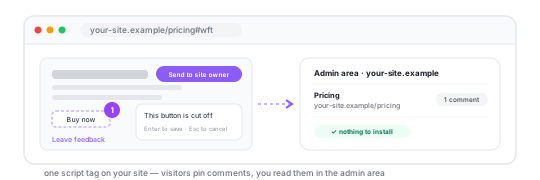
- new A feedback widget for your own site. Add one script tag and a link or a button; your visitors pin comments to the page and press Send to site owner, with no extension and no account. Add it to your site, or try it there first in a window without the extension
- new A For site owners page brings the widget and the admin area together. Reviews sent through the widget show up in your admin area once you publish
wft.jsonon your domain and sign in with Google. The privacy policy now describes the widget too
v1.16.0
Connect your AI agent by URL — nothing to install
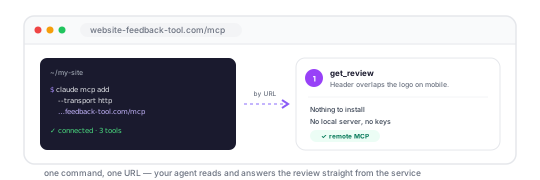
- new The MCP server now runs inside Website Feedback Tool at
https://website-feedback-tool.com/mcp. Connect it by URL with one command — nouv, no local process, no keys to set. Already running the local server? Swap that entry for the URL. Connect an agent - new The same three tools as before — read a review, reply to a comment, resolve or reopen it — for Claude Code, Codex and any other client that speaks streamable HTTP
v1.15.0
Let your AI agent answer feedback and close the loop
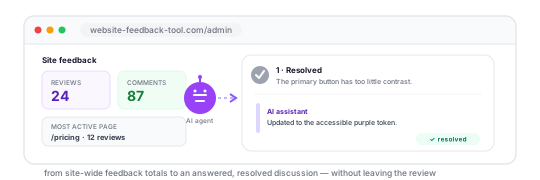
- new An AI agent connected through MCP can now reply to review comments and mark them resolved or open. Replies are signed AI assistant by default and appear in the same discussion as replies written on the review page. Connect an agent
- new The MCP review reader now includes each discussion's status and full reply history, so an agent can see the conversation before it acts and report the updated state afterwards
- new The site admin area now starts with an at-a-glance summary: total visible reviews, comments, reviewed pages and the most active pages. Private reviews are not counted
- new A review's info panel and popup now say whether it is visible to the site owner, so the sharing choice remains clear after the review has been published
v1.14.0
Choose whether the site owner sees your review
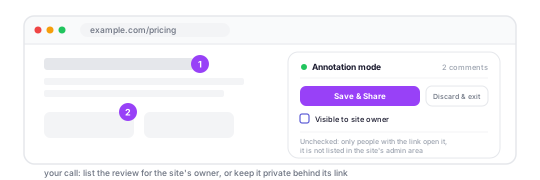
- new A Visible to site owner checkbox under Save & Share. Checked, the review is listed in the admin area of the site you annotated, for the staff that site names in its
wft.json. Unchecked, it is private: not listed there, and only people with the link can open it. Details - new The checkbox remembers your choice for each site. On a site where you haven't changed it, it starts where you last left it, and on a fresh install it starts checked
- new The choice is made once, when you share: adding comments to the review later keeps it. Reviews shared before this version, or from an extension that has not updated yet, count as private and are not listed for site owners, since their authors were never asked
- new Snapshots of heavy pages upload about five times smaller: the extension compresses them before sending, so sharing a big page (a long Google Doc, say) is quicker on a slow connection
- new The Alt+A pause shortcut is now a small hint that appears when you point at the annotation-mode bar or tab to its pause button, instead of a line at the bottom of the popup
v1.13.0
Add comments to a review you already shared
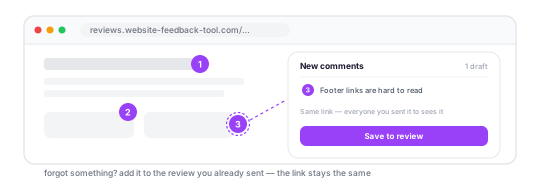
- new Forgot something? Open your review link, click Add comments in the popup, pin the new comments on the same snapshot and hit Save to review. The link stays the same, so everyone you sent it to sees the additions — no second link to send
- new New comments are numbered after the published ones and kept on the page until you save, even if you close the popup or reload the tab. Only the browser that shared the review can add to it. Details
- new A Help menu — the ? in the popup header — links to getting started, the AI agent and MCP guides, this page and keyboard shortcuts. Small “how it works” links next to Export, sharing and your review history lead to the right section of the docs
- new Short tips show up when they become relevant — after your first export or share, say — until you close them, and every tip stays listed under Help
- new The welcome page now ends with a What's next section
v1.12.0
Reply to comments and mark them resolved
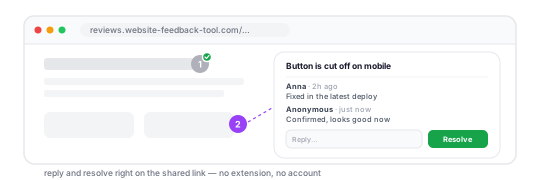
- new Feedback is no longer one-way. Anyone who opens a review link can reply to a comment right under it — no extension and no account needed. The conversation stays on the page it is about instead of moving to a chat
- new Resolve a comment once it is fixed, or Reopen it if it isn't. Resolved pins turn grey with a check mark, so what is left to do is visible at a glance
- new Signing a reply is optional: type a name and the browser remembers it, or leave it empty to post as Anonymous
- new Works on links you already sent — every existing review gets replies too, nothing to re-share
- fix Snapshots of Google Docs and other pages that draw the document on a canvas no longer come out as an empty white sheet
v1.11.0
Read every review left on your site
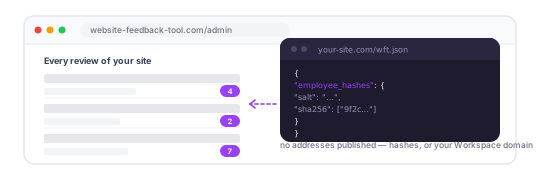
- beta If you own a site, you can now browse every review left on it, not just the links people sent you: sign in with Google at /admin and type your domain. Page title, URL, comment count, date, and a link that opens each snapshot
- new Access is granted by your site, not by us — you publish a small
wft.jsonfile and whoever it lists gets in. No invites, no seats, nothing for us to approve, and removing someone is an edit to your own file - new That file is public, so it offers three ways to name your team and two of them publish no addresses at all: the plain list, salted hashes of the addresses, or just your Google Workspace domain — which also means never editing the file when someone joins or leaves. Full reference: the docs
- beta Read-only for now: the page lists and opens reviews, it cannot delete them. Analytics on top of this history — which pages collect the most comments, how volume moves week to week — is what comes next
- fix Sharing no longer hangs on “Creating snapshot…” when Chrome stops the extension's background worker and it doesn't come back up: the popup shows each step as it runs and, if the worker stops answering, says so and how to fix it instead of blaming the server
v1.10.0
Hand a review to your AI coding agent
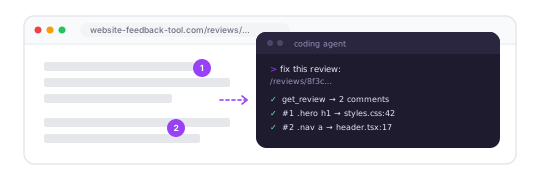
- new An MCP server, so a coding agent can read a shared review straight from its link — paste the link into Claude Code or Codex and it pulls the page, the viewport and every numbered comment with its CSS selector, no file to pass around
- new A page explaining both routes — the JSON export and the MCP server — what each one carries, and which to reach for
- new Shared reviews are now marked noindex: a snapshot of someone's page with your comments on it should never turn up in a search engine
v1.9.0
Delete your shared reviews, export comments as JSON
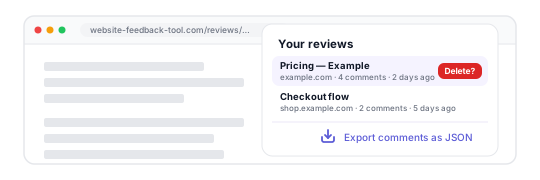
- new Changed your mind about a shared review? Hover it in your history and click ✕ — the snapshot is deleted from the server straight away and the link stops working for everyone
- new Export comments as JSON — from a page you're annotating or from a shared review. The file carries far more than the text: for each comment, the CSS selector of the element, what that element is, its computed styles and the CSS rules that match it, so a developer can go straight to the fix
- new A proper documentation page covering every feature, the export format, limits and troubleshooting
- new A landing page and a rewritten, plain-language privacy policy
v1.8.0
Annotate local files & a roomier comment box

- new Working on a local file (file://)? The popup now guides you to turn on file access and reload — no more wondering why nothing happens
- new The comment box grows as you type — up to seven lines, then scrolls — so longer notes are comfortable to write and read
- fix The Delete button in a comment popup no longer wraps onto two lines
- soon We're moving the backend to a more reliable data center — shared reviews will load faster and stay steadier
v1.7.0
Review history, sharper YouTube snapshots

- new Your past reviews live in the popup — open any of them again with one click
- new A friendly page now greets reviewers when a review link is mistyped or expired
- new Video players keep their current frame in shared reviews
- fix Comments on transient or sticky elements — tooltips, dropdowns, banners, floating popups — stay anchored in shared reviews
- fix Pages with rich graphics like charts, dashboards, and YouTube render correctly in shared reviews
v1.6.0
Pause anytime, capture tooltips, sharper snapshots

- new Pause annotation anytime — your comments stay, the page becomes interactive again, and you can resume in one click
- new Press Alt + A to start or pause annotation without opening the popup
- new Pinning a tooltip, dropdown, or other hover-revealed element? A placeholder now appears in its place when it disappears — your comment always has context
- fix Fonts and background images from external CDNs now load correctly in shared reviews
- fix Updates while annotating no longer interrupt with confusing errors — you'll see a gentle reload reminder instead
v1.5.0
Select areas, find pins faster & more

- new Drag to select any area on the page — not just click on elements
- new Scrollbar markers show where your comments are — click to jump
- new Comment list panel in the navigation bar — see all comments at a glance
- new Pin pulse animation helps you spot comments while scrolling
- new Drag the navigation bar anywhere on the page
- new Review link auto-copied to clipboard when you share
- new Quick onboarding guide on your first use
- fix Links and buttons no longer trigger while annotating
- fix Long comments without spaces now wrap correctly
v1.4.0
Rate reviews & better style capture
- new Rate your review experience with a star widget
- new Pages built with styled-components and emotion now captured perfectly
- fix Fewer permissions required — removed unnecessary browser access
v1.2.0
Smoother snapshots
- fix Sticky headers, scroll position, and nested elements now render correctly in snapshots
- fix Improved WebGL canvas capture and CSS fidelity
- fix Pin scrolling works properly in nested scroll containers
v1.1.0
Now in 15+ languages
- new Available in Japanese, Korean, Portuguese, Arabic, Turkish, Russian, and more
- new Step-by-step onboarding page after installation to help you get started in seconds
v1.0.0
Launch
- Annotate any webpage — click to place a pin and leave a comment
- Share a snapshot link with your team — no login required
- Keyboard shortcuts and markdown in comments
- Hover over any pin to preview the comment without clicking
- Canvas, WebGL, and Shadow DOM elements captured in snapshots
- External stylesheets embedded — reviews look exactly like the original page
- Original page URL shown in the review
- Reviews are stored for 90 days